
For estimators in any trade · works from your estimate

The manpower loaded schedule your GC is asking for, built from your estimate

Import the Excel estimate, and the Manloaded Schedule Builder places the work by area, sizes the crews, levels the peak, and prints the 11x17 sheets with the manpower histogram and S-curve. Done before the bid goes out, not after.

Try the 10-day demo See the sheets
Any tradePiping, steel, electrical, civil
Excel inYour estimate, your columns
11x17 outSheets, Excel, PDF
1 fileNo cloud · no subscription
What it is

A man-loaded schedule, manpower histogram and crew curve, in about ten minutes

Man-loaded, manpower loaded, manloaded, resource loaded, labor loaded. Different GCs call it different things, and they all want the same picture with your proposal: how many men you will have on site each week, by area, with a curve that looks like somebody thought about it.

Most estimators build that in a spreadsheet the night before the bid is due. This program does it from the estimate you already have. Import the Excel file, check the column mapping, set the calendar and the crew size, and the schedule and the sheets are there. Move anything you want by hand after that.

The crew curve is bell shaped by default, the way a real job staffs up and down, not a flat block. Crews always show as whole men. If you set a crew cap, the program levels the peak and tells you what it did to the finish date.

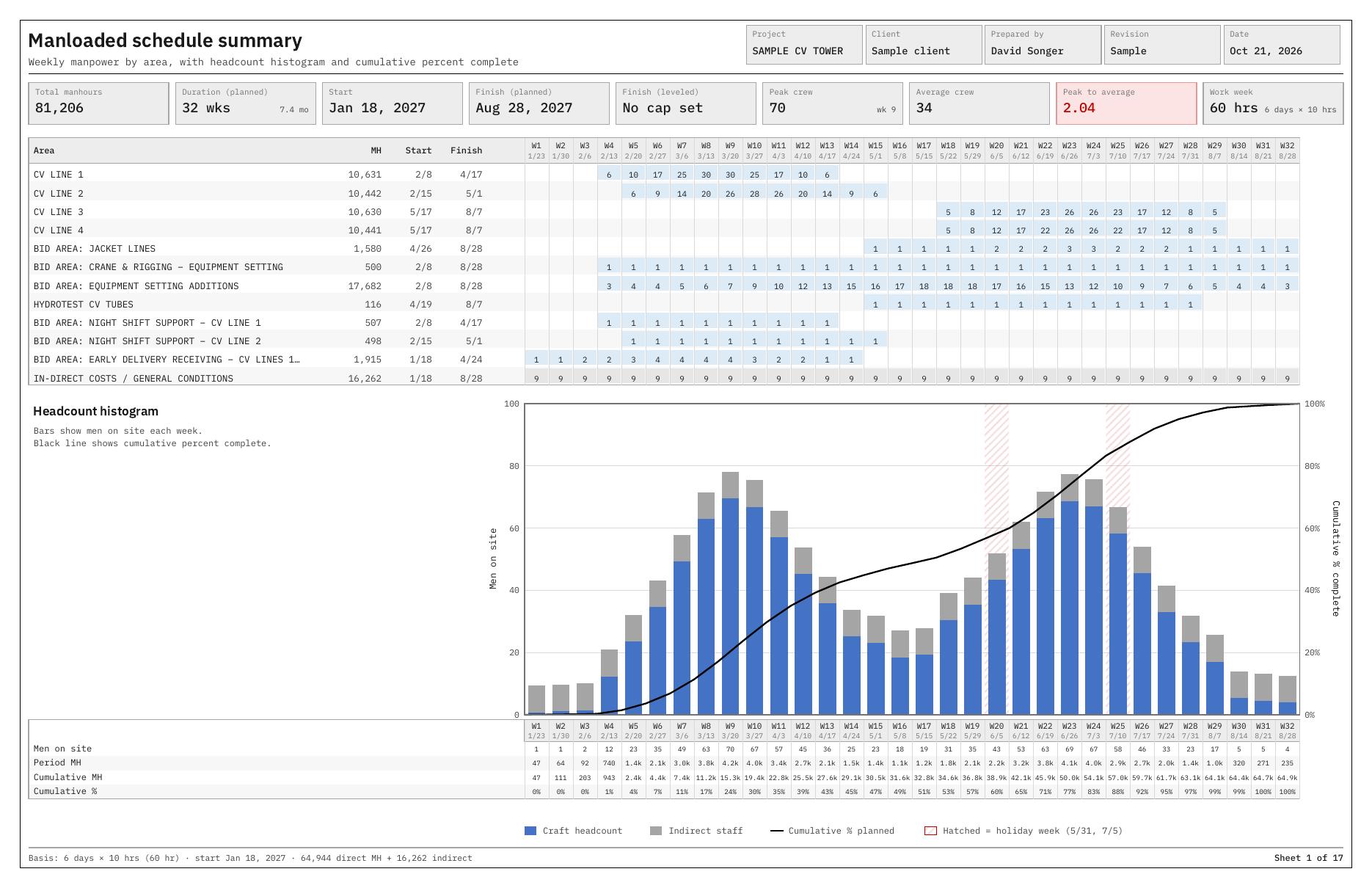
Manloaded schedule summary sheet: weekly manpower by area, headcount histogram and cumulative percent complete S-curve
How it works

Four steps, in order down the left side of the screen

The program walks you through it. Each step has a help page with pictures, one key press away.
1

Import the estimate

Open your Excel estimate. The program finds the description, manhour, area and craft columns on its own and shows you what it found. Fix a column if it guessed wrong. Zero-hour lines are set aside and listed.

2

Set the calendar and crews

Pick the work week (5x8, 5x10, 4x10, 6x10, 7x12 or your own), the start date, holidays, and either an average crew or a crew cap. Turn on craft reporting if your estimate carries crafts.

3

Place and level the work

Activities are placed by area in the order you set, with the work type inside each area. Drag anything to a different week and it locks there. Leveling pushes work later to stay under the cap, or pulls it earlier if you tell it to.

4

Print the sheets

Summary, manpower analysis, craft breakdown, activity detail, and the schedule basis. Print to PDF at 11x17, or export the whole thing to Excel with the weekly numbers behind it.

What a seasoned scheduler would want on the sheets

Built by an estimator who has had to hand one of these to a GC on bid day. The reports cover what gets asked about in the review.

Headcount histogram and S-curve

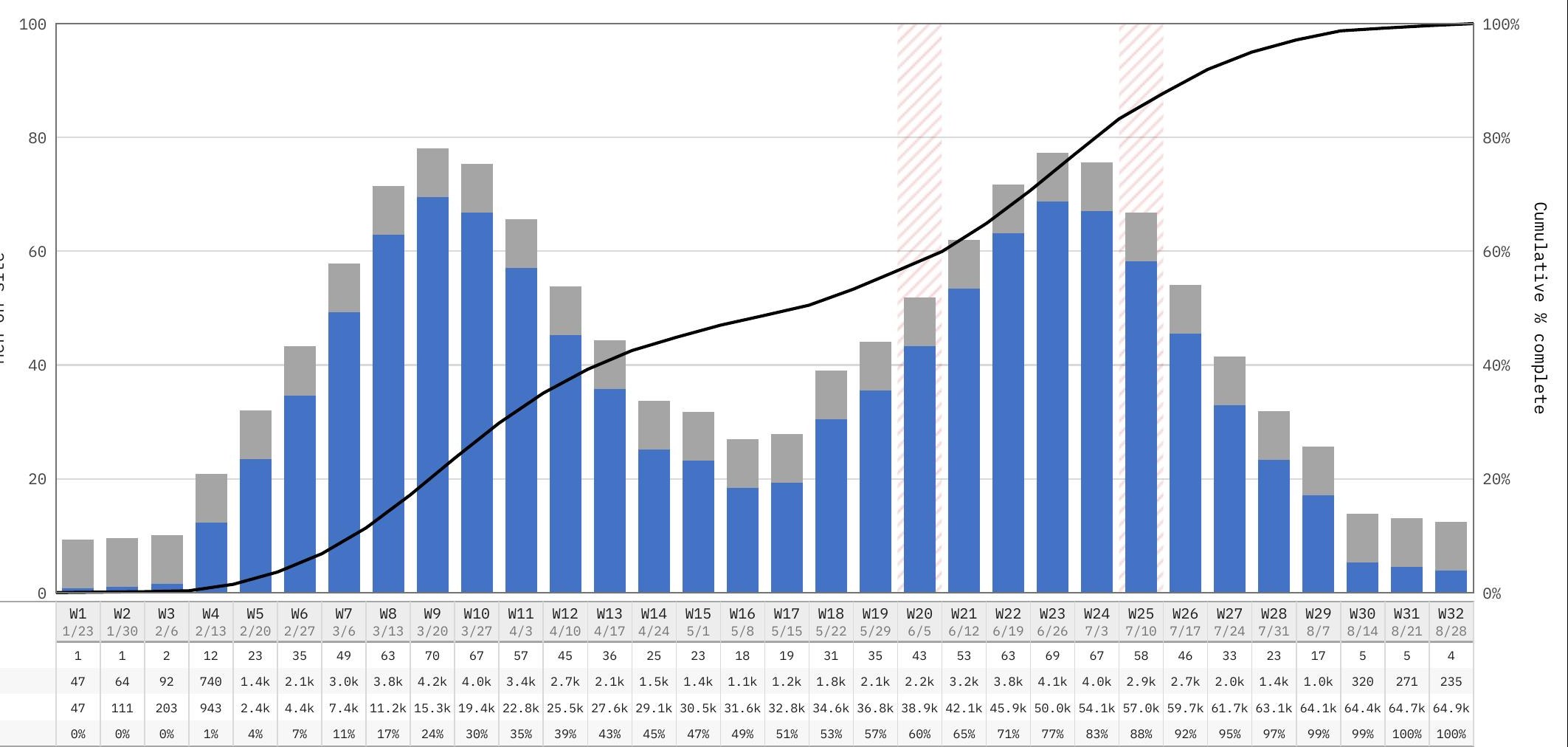
Men on site each week, craft and indirect stacked, with the cumulative percent complete line over the top. Holiday weeks are hatched so nobody asks why the bar dropped.

Manpower analysis

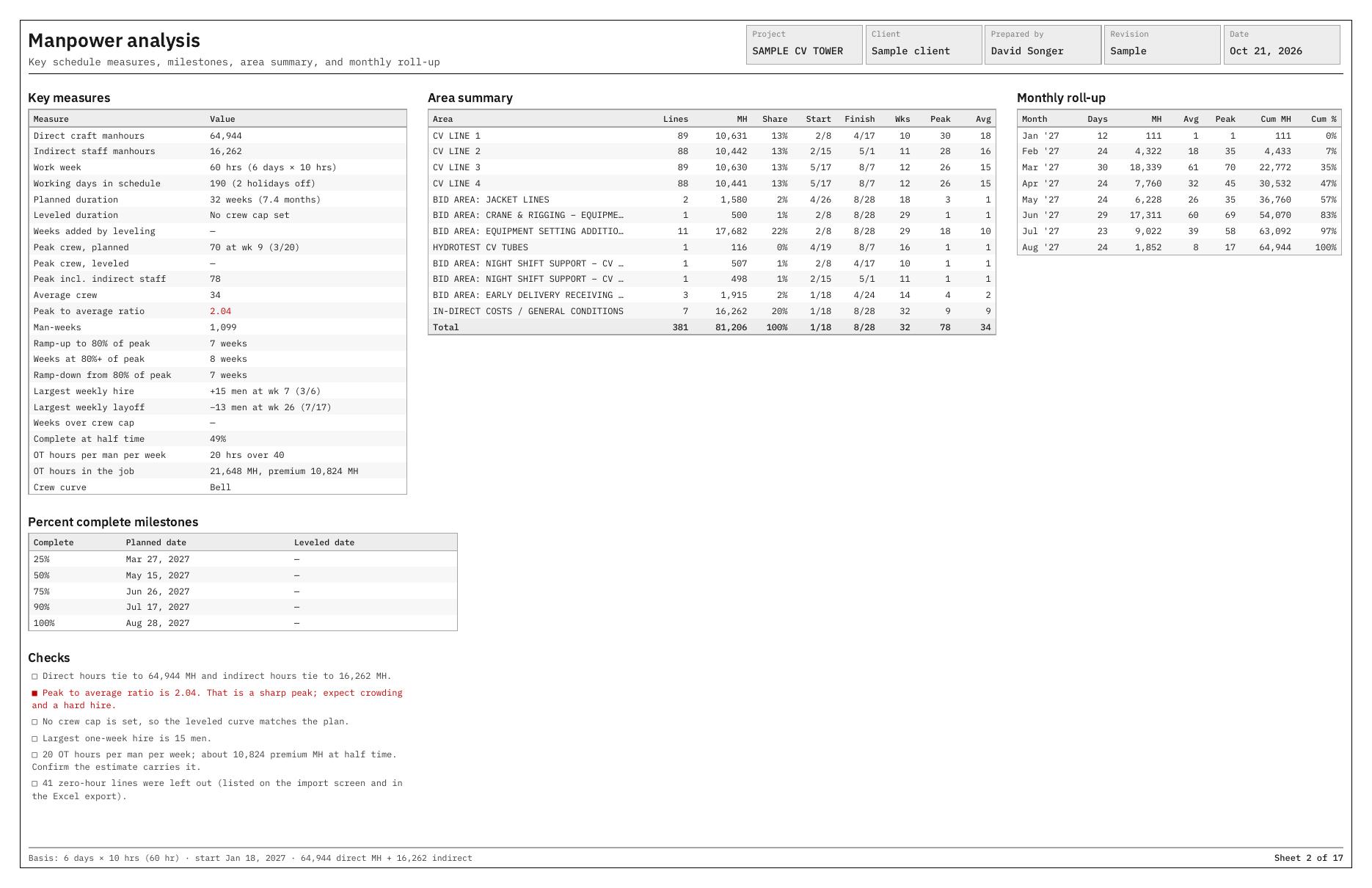
Peak crew and when it hits, average crew, peak to average ratio with a red flag when it is sharp, largest one-week hire and layoff, ramp-up and ramp-down weeks, OT hours in the job, and the 25-50-75-90 percent milestones.

Checks that tie to the estimate

The sheets state the direct and indirect hours and confirm they tie to the estimate, so the number on the schedule and the number on the bid are the same number.

Craft reports

If your estimate carries crafts, you get men per week by craft and the craft curve, which is what the labor relations and camp people want to see.

Area sequence you control

Default order is area by area with the work type inside each one, which is how most jobs really go. Drag areas into the order the site will actually be released.

Runs on your machine

One HTML file that opens in Chrome or Edge. No installer, no account, no cloud. Your estimate never leaves your computer. Save the project and come back to it for the next revision.

The printed sheets

From a real sample run through the program, a 32-week, 81,000 manhour job. Click any sheet to see it full size.
Manloaded schedule summary sheet with weekly manpower by area and headcount histogram
Manloaded schedule summaryWeekly men by area, the histogram, and the S-curve on one sheet.
Manpower analysis sheet with key measures, area summary, monthly roll-up and percent complete milestones
Manpower analysisKey measures, area summary, monthly roll-up, milestones, and the checks.
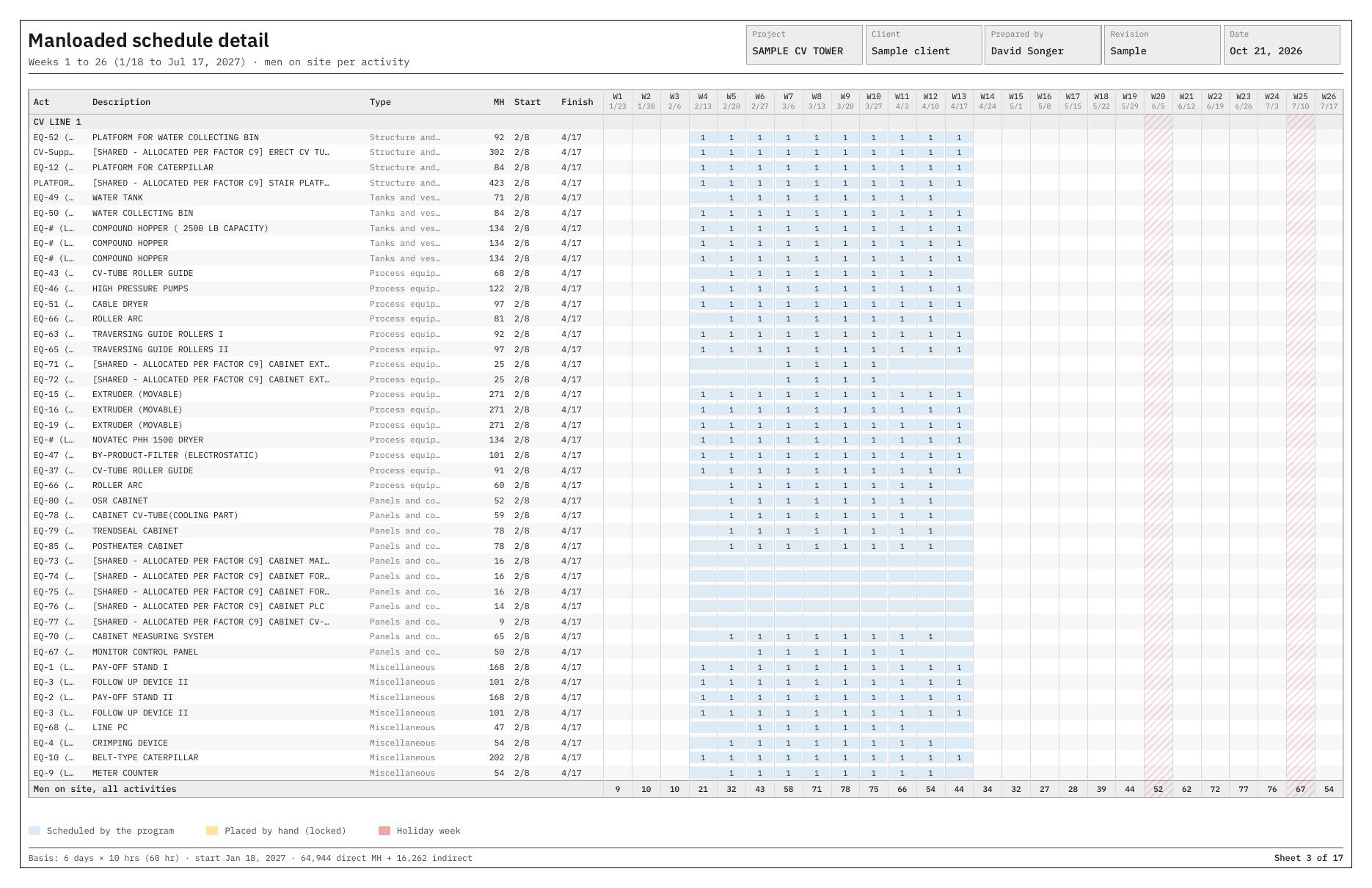
Manloaded schedule detail sheet, men on site per activity per week
Schedule detailEvery activity, men per week, with hand-placed work marked.
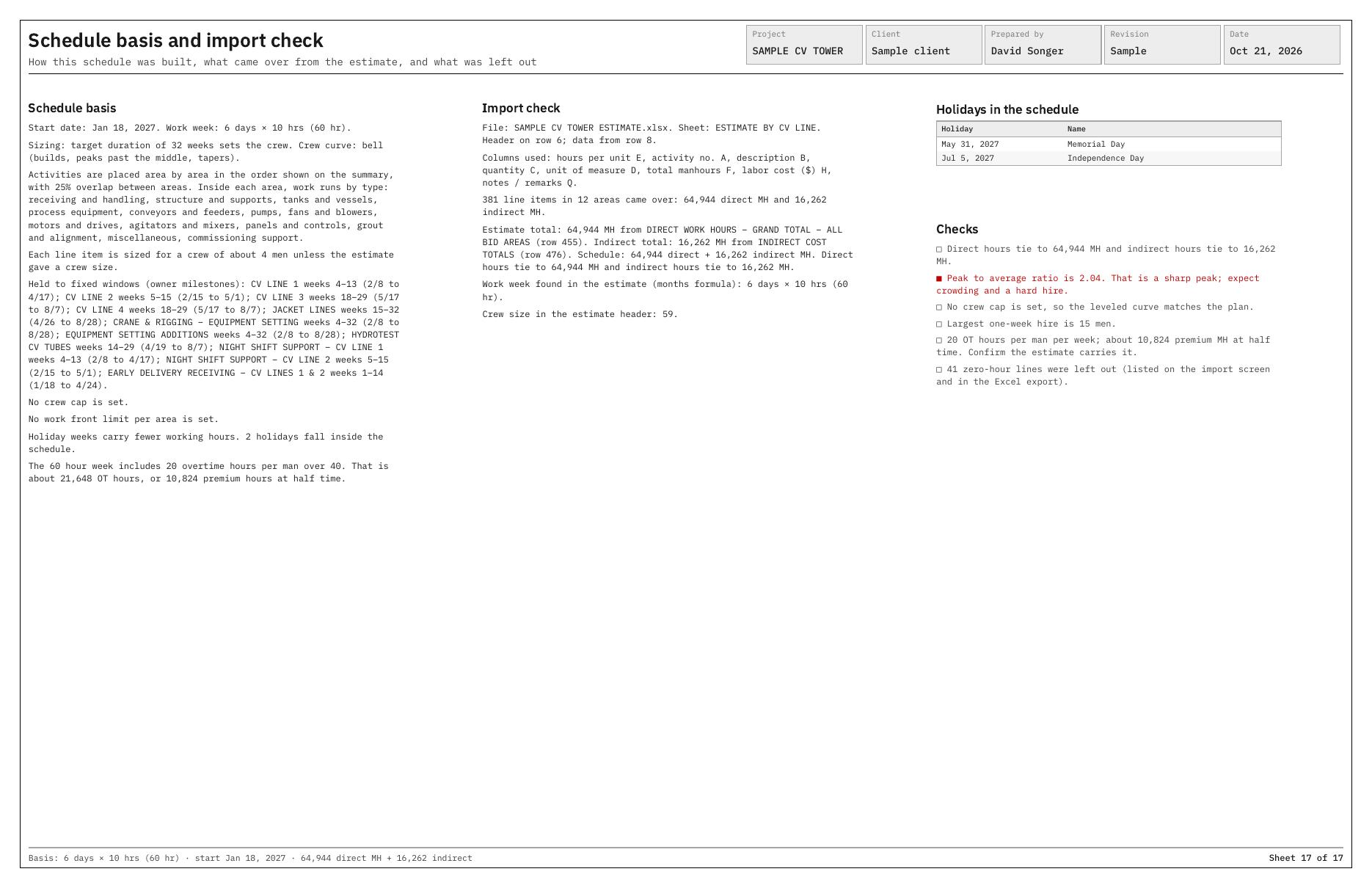
Schedule basis and import check sheet
Schedule basis and import checkWhere the hours came from, what was left out, and the settings used.

Questions estimators ask

The ones that come up when a GC asks for a man-loaded schedule with the proposal.
What is a manpower loaded schedule?

A construction schedule where every activity carries the crew it takes to do the work. Add the crews up week by week and you get the manpower histogram, which is the first thing a GC or owner looks at. It goes by man-loaded, manloaded, resource-loaded and labor-loaded; they all mean the same thing.

Is a man-loaded schedule the same as a resource-loaded schedule?

For a bid, yes. Specs and subcontracts use the terms interchangeably. Strictly speaking, resource loading can also carry equipment and cost, but what the GC wants to see with your proposal is the labor: men per week by area and craft.

Does it read a Primavera P6 or Microsoft Project file?

No, and that is on purpose. This program works from your estimate, before there is a schedule. You import the Excel estimate, it places the work by area and type, levels the crews, and prints the sheets. If you already have a P6 schedule and just need to put crews on it, this is not the tool for that.

What estimate format does it need?

Any Excel estimate with a description, manhours, and an area or system column. The import screen finds the columns itself and lets you correct it. A blank template is built into the program if you would rather fill one in.

Which trades is it for?

Any trade that bids on manhours: mechanical, piping, equipment setting, structural steel, electrical, civil, insulation, painting. If your estimate has hours by area, it will build the schedule.

Does it track progress on the job?

No. This is a bid stage tool. It builds the planned schedule and the curve that goes out with the proposal. Once the job is awarded, the schedule usually moves into the GC's P6 anyway.

What does the demo hold back?

The demo is the full program for 10 days, limited to the first 10 activities of an estimate, and every printed sheet carries a DEMO banner. That is enough to run your own numbers through it and see the sheets. A license removes all three.

Crew setting a large vessel at dusk
Who built it

Written by the guy who had to hand one to the GC

This program was built by an industrial construction estimator who has spent his career pricing mechanical, piping, equipment setting and steel work, and who has built more man-loaded schedules in Excel at ten o'clock the night before a bid than he cares to count.

It is the same tool he uses on his own bids. The sheets are laid out the way a chief estimator and a GC scheduler expect to read them, and the checks on the analysis sheet are the questions that get asked in the bid review.

It is a companion to the Industrial Equipment Setting Estimator, but it stands on its own. Any trade, any estimate with hours in it.
Straightforward pricing

One-time license. No subscription, no per-bid fees, no cloud account.
Launch pricing — until Dec. 31, 2026

Single seat

$395$295
per seat · one-time
  • Full program, no activity limit
  • All sheets, Excel + PDF, no banner
  • Licensed to one estimator
  • Free updates through launch year
Buy now — $295
Start with the free demo

Company license

$1,495
unlimited seats · one company · one-time
  • Everything in Single Seat
  • Install for your whole estimating group
  • One license file for the office
  • Priority email support
Ask about company licensing
Optional annual maintenance (updates) available at roughly 20% of list. Never required. Your license never expires.
Free demo

Try it on your own estimate for 10 days

The demo is the full program. It keeps the first 10 activities of whatever estimate you import, which is enough to see how it places the work, levels the crew, and prints the sheets. Printouts carry a DEMO banner. It expires after 10 days. Enter your details and the download link arrives by email. No card, no call.

10-day trial · first 10 activities · runs offline in your browser · nothing installed
Close-up of the manpower histogram with the cumulative percent complete curve

Support

Questions about the demo, licensing, or whether it will read your estimate? Email and you'll hear back from the estimator who built it.

[email protected]  ·  [email protected]